 November 22, 2026 • 6 min read • Published by David G. Smith
Midnight Commander: The Most Underrated Tool in Linux Administration
This morning I've been making a few updates to my home lab server.
Nothing particularly exotic by today's standards. A little work on Coolify. Some container updates. Updating my floci local-AWS environment. Adjusting configuration for code-server. Updating Ollama models. The usual collection of self-hosted tools that somehow expanded from "one Linux box" into an entire containerized ecosystem.
As I bounced between config files, Docker volumes, logs, and directories, I realized something.
For all the excitement around new terminal tools, fancy shells, AI-assisted workflows, and modern Rust-based utilities, I was still doing most of the work with a tool that's been around for decades:
Midnight Commander.
And it remains one of the most underrated pieces of software in the Linux ecosystem.
From Norton Commander to Midnight Commander
My appreciation for Midnight Commander probably started long before I ever installed Linux.
To show my age, as a kid I grew up with PCs in the 1980s and early 1990s, I spent a lot of time in MS-DOS, before Windows 3.1 came along with its UI. That's when I discovered Norton Commander. It transformed DOS from a collection of cryptic commands into something that felt approachable and productive.
Need to copy files? F5.
Move them? F6.
Edit a configuration file? F4.
View a file? F3.
Two panes. Keyboard-driven. Fast.
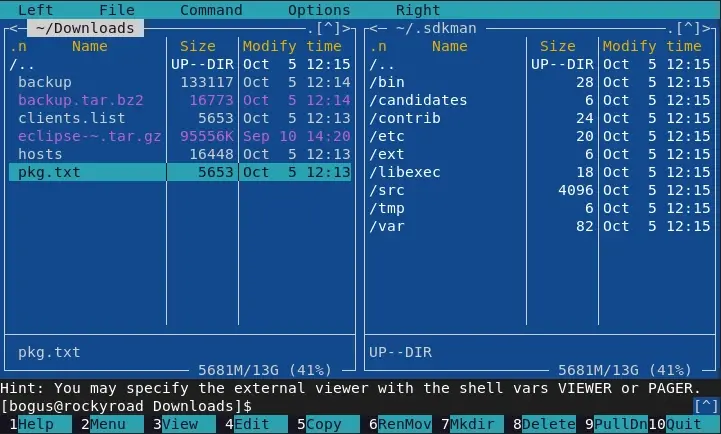
You always knew where you were, where you were going, and what operation you were about to perform.
In the '90s I also moved into Linux and discovered Midnight Commander, it felt immediately familiar. It wasn't a clone in the legal sense, but it carried forward nearly everything that made Norton Commander great.
Three decades later, it is still one of the first packages I install on a new server.
The Hidden Cost of "Pure Shell"
Linux culture often celebrates memorization.
- Use
cp. - Use
mv. - Use
find. - Use
chmod. - Use
chown. - Use
tar. - Use
less. - Use
grep. - Use
sed. - Use
awk.
And to be clear, those tools matter. Every person managing a linux system should understand them.
But understanding a tool and wanting to manually invoke it for every operation are two different things.
When I'm exploring an unfamiliar directory structure, comparing folders, locating configuration files, adjusting permissions, reviewing logs, and moving files between locations, I don't necessarily want to construct a dozen shell commands and manually type out paths and filenames.
I just want to get work done.
Midnight Commander provides a fast visual interface over many of those common administrative tasks without hiding what's actually happening.
It reduces friction.
The Linux terminal doesn't stop being powerful. It becomes more efficient.
What Midnight Commander Actually Does
Many people think of MC as just a file manager. That's like calling a Swiss Army knife "a blade." The file manager is only the beginning.
A typical administration session might involve:
- Browsing directory structures
- Searching for files
- Viewing logs
- Editing configuration files
- Comparing directories
- Changing ownership
- Adjusting permissions
- Browsing archive files
- Managing symlinks
- Accessing remote systems
- Copying and moving large collections of files
MC wraps all of these capabilities into a unified interface.
Need to check a Docker volume mount buried three levels deep?
Navigate there.
Need to edit a YAML configuration?
Hit F4.
Need to verify a file before changing it?
F3.
Need to compare two deployment directories side-by-side?
Open them in opposite panels.
Need to inspect a tarball?
Enter it like it's a directory.
None of this requires remembering a complex sequence of commands.
Why It Still Matters in 2026
The modern Linux terminal ecosystem is thriving.
We have excellent tools for linux these days, in fact, some are objectively better than Midnight Commander at their specific jobs.
ripgrep is a superior search tool.
zoxide is a superior navigation tool. cd on steroids
fzf (fuzzy find) is often a superior discovery tool.
Yazi is arguably a more modern file manager.
But that's also the point. Most modern tools are specialists.
Midnight Commander is a generalist. It's the difference between carrying a toolbox and carrying a multitool.
If I'm building a highly optimized workflow on my own machine, I may reach for individual best-in-class tools.
But if I'm SSH'd into a server at 2:00 a.m. trying to figure out why a process failed, MC is often the first thing I launch.
The Great Linux Contradiction
One of the more amusing things about the Linux community is its tendency to rediscover old ideas and package them as something new.
Today you'll find countless YouTube videos and blog posts showcasing workflows built from:
tmuxfzfzoxidebatyaziripgrepfd
All excellent tools.
But many of those workflows ultimately solve the same usability problems that Midnight Commander addressed years ago.
The difference is mostly philosophical. Modern tools embrace composition. mc embraces integration. Neither approach is wrong.
But seeing others pounding out command after command, I sometimes wonder how many Linux users have assembled five separate utilities to avoid using the one package that already solved most of the problem.
A Rust Thought Experiment
Every so often I imagine what would happen if someone rewrote Midnight Commander from scratch in Rust.
- Give it a modern terminal UI.
- GPU-accelerated rendering.
- Native previews.
- Git awareness.
- Plugin architecture.
- Async operations.
- Rich file metadata.
- Maybe even optional integration with Docker, Kubernetes, and SSH session management.
The Linux community would probably lose its mind.
People would rave about how innovative it was. YouTubers would call it a game changer.
Yet the funny thing is that after the excitement faded, most of us would still be using it for the exact same reasons we use Midnight Commander today.
Because the underlying idea was already right. A fast, keyboard-driven, terminal-native environment for managing systems is simply useful. The implementation details are secondary.
Old Software Doesn't Mean Obsolete Software
Technology has a tendency to confuse age with irrelevance. Sometimes that's justified. Sometimes an old tool really has been surpassed.
But occasionally you find software that survives not because it's nostalgic, but because it remains effective. Midnight Commander falls firmly into that category.
It's not flashy. It's not trendy. It's not winning social media popularity contests.
But while everyone else is debating terminal themes and assembling ever more elaborate command-line workflows, Midnight Commander continues doing what it's done for decades:
Helping administrators get things done.
And sometimes that's exactly what you need.
Author: David G. Smith • Source: https://davidgsmith.net/thoughts/midnight-commander-the-most-underrated-tool-in-linux-administration.html



Related Thoughts
Perspectives sharing related architectures, models, and domain context.
The End of Data Copies? What a Google Cloud Iceberg Demo Reveals About the Future of Analytics
For years, the modern data stack has suffered from an oddly accepted inefficiency: everybody gets their own copy of the...
DuckDB 2.0.1: The Release That Shows DuckDB Is Growing Up
Most software projects become popular because of new features. The successful ones become boring. At first glance, the...
CNG Forum 2026 Sessions Posted to YouTube
If like me you missed the Cloud-Native Geospatial (CNG) Forum 2026 in Snowbird, Utah this October, or if you were there...